The navigation panel is fixed in the upper corner and subsumes every interaction needed to navigate in a map. Additional the user can move the scalebar pointer in steps up and down to zoom in or out.
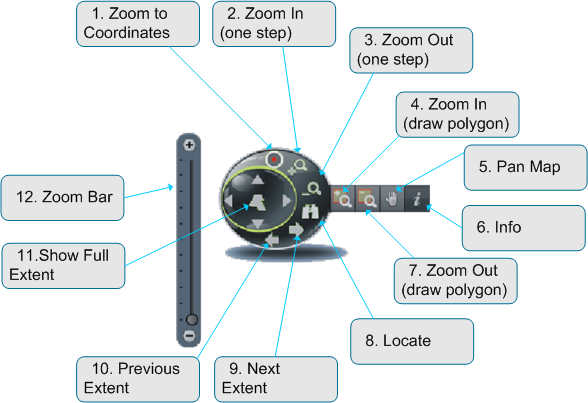
- Zoom to Coordinate
- Zoom In (one step)
- Zoom Out (one step)
- Zoom In (draw polygon)
- Pan Map
- Info
- Zoom Out (draw polygon)
- Locate
- Show next Extent
- Show previous Extent
- Show full Extent
Show Coordinates
Simple tool to continuously display the coordinates of appropriate place as the mouse cursor hovers over the map. The display is always enable, fixed in the lower corner of the map and cannot be removed or turned off. It shows the coordinates (Latitude and Longitude) in decimal degree.
Zoom to Coordinates
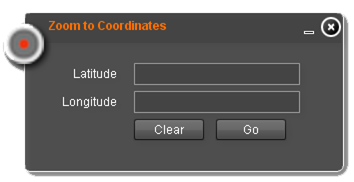
Zoom to coordinate provides an easy way to move the mapcenter to a known coordinate entered by the user. The latitude and longitude inputfields enable the user to quickly insert the coordinate in decimal degree like its shown in Show coordinates. The only difference is that up to 20 fractional digits are possible but not necessary.
Zoom to Location
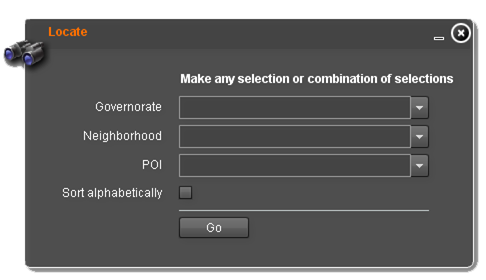
Zoom to Location is implemented into the navigation panel and provides a quick and easy way to zoom to preconfigured set of well-known locations, Hot-Spots or Points of Interest. Three selectionfields are available:- Governorate
- Neighborhood
- POI - Point of Interest